


How to create a Qweb report in odoo

Qweb is a template engine or reporting engine which can be used to create reports. Odoo uses Qweb for generating reports. Qweb provides several tools for creating a report. By using Qweb, we can manipulate the data very easily.
This blog will provide insight on how we can create a custom PDF Report in Odoo 14?

How Qweb Reports Work in Odoo?
1: Under report add new file named “report.xml”
In “report.xml” add :
syntax as follws:
<?xml version="1.0" encoding="UTF-8"?>
<odoo>
    <report id="report_id"
          model="module.name"
          string="report related name"
          report_type="qweb-pdf"
          name="custom_module_name.body_template_id"
          file="custom_module_name.body_template_id"/>

-> Here name and file should be custom addon name . body template id from corresponding xml file
In practical case:
<?xml version="1.0" encoding="UTF-8"?>
<odoo>
    <report id="estimate_invoice_report_id"
          model="estimate.contract"
          string="Estimate Contract"
          report_type="qweb-pdf"
          name="building_contract.estimate_order_body_format"
          file="building_contract.estimate_order_body_format"/>
Defining Report Templates:
Templates are designed in an HTML format. The structure will be written inside of <template> tags. We can use other templates inside our template using t-call property.
2: You can create an xml file inside the report directory
syntax as follows:
<?xml version="1.0" encoding="UTF-8" ?>
<odoo>
<template id="report_header_template_id">
<t t-call="web.html_container">
<t t-if="not o" t-set="o" t-value="doc"/>
<t t-if="not company">
<!-- Multicompany -->
<t t-if="company_id">
<t t-set="company" t-value="company_id"/>
</t>
<t t-elif="o and 'company_id' in o">
<t t-set="company" t-value="o.company_id.sudo()"/>
</t>
<t t-else="else">
<t t-set="company" t-value="res_company"/>
</t>
</t>
<div class="header" t-att-style="report_header_style">
<div class="row">
</div>
</div>
<div class="col-9 text-right" t-field="company.report_header" name="moto">
<div t-field="company.partner_id" t-options="{"widget": "contact", "fields": ["address", "name"], "no_marker": true}"/>
</div>
<div class="article" t-att-data-oe-model="o and o._name" t-att-data-oe-id="o and o.id" t-att-data-oe-lang="o and o.env.context.get('lang')">
<t t-raw="0"/>
</div>
<div class="footer o_background_footer">
<div>
<div t-field="company.report_footer"/>
<div t-if="report_type == 'pdf'" class="text-muted">
<hr style="width:100%;" color="red"/>
<div class="row">
<div class="col-6" style="text-align:right;">
Page:
<span class="page"/>
/
<span class="topage"/>
</div>
</div>
</div>
</div>
</div>
</t>
</template>
<template id="report_order_body_format">
<t t-call="web.html_container">
<t t-foreach="docs" t-as="o">
<t t-call="module_name.report_body_template_id">
<div class="page">
<table style="border:1px solid black;width:100%">
<tr>
<td>P Type</td>
<td><t t-esc="o.p_type.name"/></td>
<td>Location</td>
<td><t t-if="o.location"/></td>
</tr>
<tr>
<td>Address</td>
<td><t t-esc="o.address"/> </td>
<td>Currency</td>
<td><t t-esc="o.currency"/> </td>
</tr>
<tr>
<td>Furnishing</td>
<td><t t-esc="o.furnishing"/> </td>
<td>Area of building</td>
<td><t t-esc="o.area_of_building"/> </td>
</tr>
<tr>
<td>Expexted Date</td>
<td><t t-esc="o.expected_date"/> </td>
<td>Area of building</td>
<td><t t-esc="o.area_of_building"/> </td>
</tr>
<tr>
<td>Created Date</td>
<td><t t-esc="o.created_date"/> </td>
<td>Budget</td>
<td><t t-esc="o.budget"/> </td>
</tr>
</table>
<table style="border:1px solid black;width:100%">
<tr>
<td style="border:1px solid black">Product</td>
<td style="border:1px solid black">Quantity</td>
<td style="border:1px solid black">Unit Price</td>
<td style="border:1px solid black">Total Price</td>
</tr>
<t t-foreach="o.order_line" t-as="one_to_many">
<tr>
<td style="border:1px solid black"><t t-esc="one_to_many.product_id.name"/> </td>
<td style="border:1px solid black"><t t-esc="one_to_many.quantity"/></td>
<td style="border:1px solid black"><t t-esc="one_to_many.unit_price"/></td>
<td style="border:1px solid black"><t t-esc="one_to_many.total_price"/></td>
</tr>
</t>
</table>
</div>
</t>
</t>
</t>
</template>
</odoo
-> here you have to change header template_id, body template_id and under body template_id change this one also <t t-call=”module_name.header_template_id”>
In practical Case:
<?xml version="1.0" encoding="UTF-8" ?>
<odoo>
<template id="estimate_order_header_format">
<t t-call="web.html_container">
<t t-if="not o" t-set="o" t-value="doc"/>
<t t-if="not company">
<!-- Multicompany -->
<t t-if="company_id">
<t t-set="company" t-value="company_id"/>
</t>
<t t-elif="o and 'company_id' in o">
<t t-set="company" t-value="o.company_id.sudo()"/>
</t>
<t t-else="else">
<t t-set="company" t-value="res_company"/>
</t>
</t>
<div class="header" t-att-style="report_header_style">
<div class="row">
</div>
</div>
<div class="col-9 text-right" t-field="company.report_header" name="moto">
<div t-field="company.partner_id" t-options="{"widget": "contact", "fields": ["address", "name"], "no_marker": true}"/>
</div>
<div class="article" t-att-data-oe-model="o and o._name" t-att-data-oe-id="o and o.id" t-att-data-oe-lang="o and o.env.context.get('lang')">
<t t-raw="0"/>
</div>
<div class="footer o_background_footer">
<div>
<div t-field="company.report_footer"/>
<div t-if="report_type == 'pdf'" class="text-muted">
<hr style="width:100%;" color="red"/>
<div class="row">
<div class="col-6" style="text-align:right;">
Page:
<span class="page"/>
/
<span class="topage"/>
</div>
</div>
</div>
</div>
</div>
</t>
</template>
<template id="estimate_order_body_format">
<t t-call="web.html_container">
<t t-foreach="docs" t-as="o">
<t t-call="building_contract.estimate_order_header_format">
<div class="page">
<table style="border:1px solid black;width:100%">
<tr>
<td>P Type</td>
<td><t t-esc="o.p_type.name"/></td>
<td>Location</td>
<td><t t-if="o.location"/></td>
</tr>
<tr>
<td>Address</td>
<td><t t-esc="o.address"/> </td>
<td>Currency</td>
<td><t t-esc="o.currency"/> </td>
</tr>
<tr>
<td>Furnishing</td>
<td><t t-esc="o.furnishing"/> </td>
<td>Area of building</td>
<td><t t-esc="o.area_of_building"/> </td>
</tr>
<tr>
<td>Expexted Date</td>
<td><t t-esc="o.expected_date"/> </td>
<td>Area of building</td>
<td><t t-esc="o.area_of_building"/> </td>
</tr>
<tr>
<td>Created Date</td>
<td><t t-esc="o.created_date"/> </td>
<td>Budget</td>
<td><t t-esc="o.budget"/> </td>
</tr>
</table>
<table style="border:1px solid black;width:100%">
<tr>
<td style="border:1px solid black">Sn></td>
<td style="border:1px solid black">Product</td>
<td style="border:1px solid black">Quantity</td>
<td style="border:1px solid black">Unit Price</td>
<td style="border:1px solid black">Total Price</td>
</tr>
<t t-set="i" t-value="1"/>
<t t-foreach="o.order_line" t-as="one_to_many">
<tr>
<td style="border:1px solid black"><t t-esc="1"></td>
<td style="border:1px solid black"><t t-esc="one_to_many.product_id.name"/> </td>
<td style="border:1px solid black"><t t-esc="one_to_many.quantity"/></td>
<td style="border:1px solid black"><t t-esc="one_to_many.unit_price"/></td>
<td style="border:1px solid black"><t t-esc="one_to_many.total_price"/></td>
</tr>
<t t-set="i" t-value="i+1"/>
</t>
</table>
</div>
</t>
</t>
</t>
</template>
</odoo>
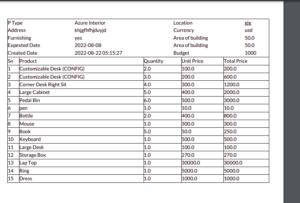
<t t-set="i" t-value="1"/> These code is used to display the sequence number in reports, you have
<t t-set="i" t-value="i+1"/> 20 products it diaplays in 1,2,3, like that :
Print of estimate order
 To Use This one Click here
To know more about us
To Use This one Click here
To know more about us